UltraVNC: VNC remote desktop tool
UltraVNC is a remote desktop tool for Windows systems. It lets a local computer view and control a remote computer’s desktop over a network using the VNC/RFB protocol. The application is useful for IT support, troubleshooting, and managing Windows machines that require direct remote access.
Top Recommended Alternative
What does UltraVNC do?
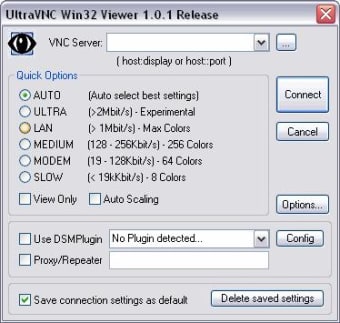
UltraVNC uses a Viewer and Server setup. The Server runs on the computer being controlled, while the Viewer runs on the computer used to access it. Once connected, the Viewer displays the remote desktop and sends keyboard and mouse input to the remote machine. UltraVNC is compatible with RealVNC, TightVNC, and many other VNC variants, which helps it work in mixed VNC environments.
File transfer and chat
UltraVNC can transfer files and complete folders between the Viewer and Server. Files are compressed before transfer, which helps reduce bandwidth use. Its built-in chat feature runs through the active VNC connection and can be opened during a session for quick communication between the local and remote users. The chat is temporary, so it is better suited for support conversations than message history.
Security and encryption
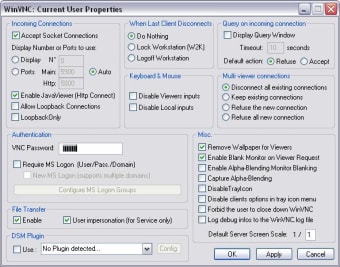
UltraVNC supports optional DSM encryption plugins to secure communication between the Viewer and Server. This helps protect remote-screen data during transmission and reduces the risk of man-in-the-middle attacks. Because encryption is optional, administrators should configure access and security settings carefully, especially when using UltraVNC outside a trusted local network.
Technical remote access for Windows
UltraVNC is a solid option for Windows remote support, especially for IT teams that need direct desktop control, VNC compatibility, file transfer, quick chat, and optional encrypted sessions. Its Viewer and Server setup makes it practical for troubleshooting, administration, and hands-on support across managed Windows environments.